The Author – Bart Busschots
Creative Commons
Unless otherwise stated, the content on this site is licensed under Creative Commons Attribution, Noncommercial, No Derivative Works 3.0 License







Apr
10
Accessing Windows from OS X With RDP
Filed Under Computers & Tech on April 10, 2008 at 6:02 pm
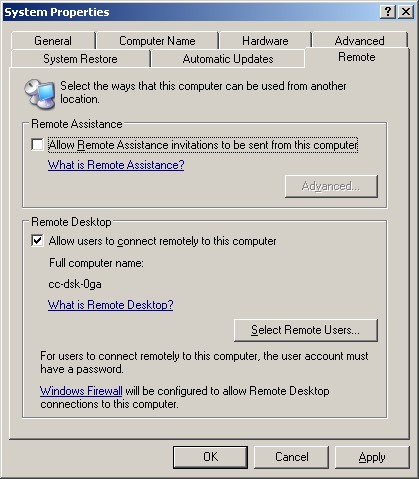
At the request of @indieradiochatt this is just a quick and dirty guide for accessing a Windows XP machine from your Mac using RDP. The first step is to enable Desktop Sharing on your Windows box. To do this you go to the System applet in the Control Panel and select the Remote tab. Then just check the Allow users to connect remotely to this computer checkbox (see screen shot). If you use the Windows firewall this is all you’ll need to do, if you use a custom firewall you’ll have to figure out how to let in RDP traffic.
Then you just need an RDP client for the Mac like Microsoft’s Remote Desktop Connection or the free and open source CoRD. You should now be able to connect to your Windows XP machine with either of these clients using the NetBIOS name of the Windows machine (or its IP address), your Windows username & password and your Windows Domain (if applicable). That should be all there is to it.
[tags]Remote Desktop Protocol, RDP, Windows, Mac, CoRD[/tags]
Hey man,thanks alot. I can’t believe it’s that easy. Windows machines are do unsecure. I’m running a shoutcast server and wanted better way to access the machine without having to go to the machine.I’m a lazy musician I suppose! Thank aslot again!
-Jimi Lee
http://www.indieradiochattanooga.com
[…] are available at bartbusschots.ie/blog/?p=744. Bart’s RDP instructions for Windows are at bartbusschots.ie/blog/?p=748 and Bart finds a full binary download of the GIMP for Leoapard at […]
Thanks for this tip. I assume this is not feasible if one is running XP Home edition. Do you have any other options for me to take control of my PC using my Mac?
Hi Carlos,
I’m pretty sure XP Home does not contain the RPD service so no, I don’t think this is an option for you. An alternative is VNC. There are VNC servers for Windows and VNC clients for the Mac (I like Chicken of the VNC) so that should work for you.
Bart.
Are you sure you can use netbios? I can only get this working with IP.
Hi Stu,
It may depend on how your network is set up. We have a WINs server dealing with windows name resolution on our network, and I have OS X set up to use that server.
Bart.